


OctaneRender for HoudiniSolaris 2026.1.0.1

Sub forum for plugin releases
BK
OctaneRender Team
Posts: 1491
Joined: Mon Oct 31, 2016 7:54 pm

OTOY® is proud to announce the availability of the new DCC plugin OctaneRender for HoudiniSolaris 2026.1.0.1 release.

The world's fastest unbiased GPU rendering engine on CUDA and Metal now integrates completely with Houdini 20.0, Houdini 20.5 & Houdini 21.0 Solaris.
OctaneSolaris builds supported by this release: 20.0.896, 20.5.684, 21.0.440, 21.0.512 and 21.0.559

What is OctaneRender for Solaris?
The OctaneRender for Solaris plugin is based on Pixar’s USD (Universal Scene Description) and Pixar’s Hydra API to empower artist workflows across look development, scene layout, lighting, and final rendering.
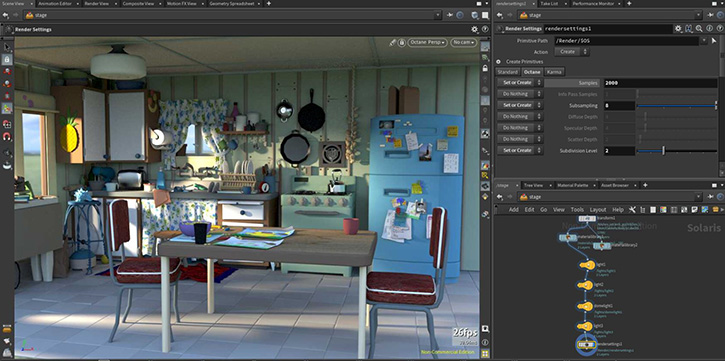
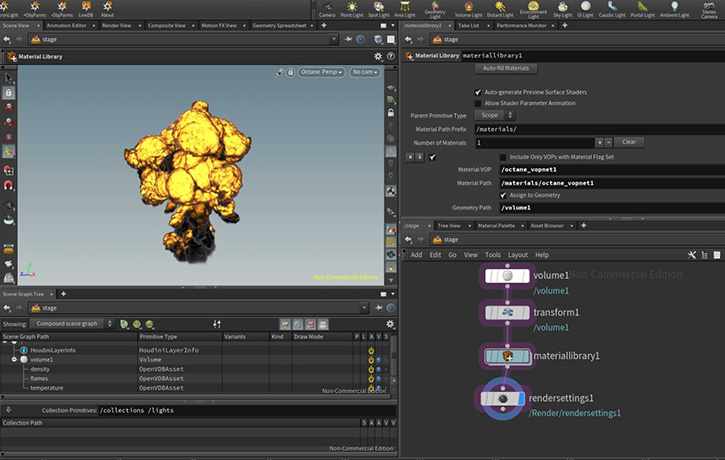
Image

Image

Pixar's USD pipeline
https://renderman.pixar.com/stories/pixars-usd-pipeline

-Installation steps-
-Recommended: Automated installation using scripts-
- On windows run the createPackageFileForOctane.bat file and follow the instructions. This should setup all the necessary paths for you.
- On macos/linux run the createPackageFileForOctane.sh file and follow the instructions. One way to do this is to open a terminal window, type sh and then drag the sh file onto the terminal and hit enter.
-Alternative: Manually setup Houdini package json file-
- Create a folder inside Documents\houdini21.0 and name it "Packages" (if it doesn't already exist)
- Open notepad or any text editor, use the code below, but replace the PATH/TO/OCTANE to the location of your octane installation.
- Note: You must use / or \\ in the path. Single \ will not work.
Code: Select all

Code: Select all

{
    "enable": true,
    "env": [
        {
            "OCTANE_AUTOSPAREPARAMS": {
                "value": 1
            }
        },
        {
            "OCTVERSION": "PATH/TO/OCTANE"
        },
        {
            "HOUDINI_PATH": {
                "value": "$OCTVERSION"
            },
            "HOUDINI_MENU_PATH": {
                "value": "$OCTVERSION/config/Menus"
            },
            "HOUDINI_SCRIPT_PATH": {
                "value": "$OCTVERSION/scripts"
            },
            "PATH": {
                "value": "$OCTVERSION/bin"
            },
            "PXR_PLUGINPATH_NAME": {
                "value": "$OCTVERSION/dso/usd_plugins"
            }
        }
    ]
}
- Then Save as Octane.json

IMPORTANT NOTE: Installation via the houdini.env file is no longer supported. Please remove any mention of octane from the Houdini.env file as otherwise the plugin won't function properly!

New features
To learn more about the new features and improvements of OctaneRender 2026.1 and the Render Node app, please check out (Link )


Change log since last release
  • - Unified with OctaneRender 2026.1 for Houdini production (2026.1.0.1) viewtopic.php?t=85443
  • - Implemented Octane Materials for Mtlx nodes

Note: Click the link below to refer to the Important SOP to USD attribute conversion
https://www.sidefx.com/docs/houdini18.5/solaris/sop_import.html


Important notes:

[*] The minimum NVIDIA driver version required has been raised to R528 (R572 for GeForce RTX50 Series).
[*] The GPU version of Open Image Denoise is supported on Volta and Ada GPUs currently. The CPU version is used on devices with other models, and on macOS..
[*] The minimum version of macOS required is 14.5.[/b]

Linux Note
On Linux only default Houdini builds are supported.
This means that for Houdini 20.0, 20.5 and 21.0 gcc11.2 builds are supported.

Note: Please do not use Houdini 21 builds for production yet. We are releasing it as an experimental release and to collect bug reports.


=================================
Subscription Studio+ Downloads
=================================

OctaneSolaris [macOS](Link)

OctaneSolaris [Linux](Link)

OctaneSolaris [Windows](Link)


=================================
Demo Downloads
=================================

OctaneSolaris [Windows](Link)

OctaneSolaris [Linux](Link)


Happy GPU Rendering !!


Your team
OTOY
Kind Regards

bk3d
Master_39
Licensed Customer
Posts: 18
Joined: Fri Apr 15, 2016 9:20 pm

Hi,

I’m using Houdini 21 + Octane Render 2026 with Octane in Solaris (USD) and I’m seeing unexpected behavior with the Octane Camera Imager.

Specifically:

Enabling ACES Tonemapping in the Octane Camera = Imager produces no visible effect.

The Denoiser controls in the Camera Imager also seem to do nothing:

On / Off

Blend value from 0 to 1
no change in viewport or render.

Scene context:

Houdini Color Settings set to ACES
Octane Render Target output set to ACEScg
Textures correctly tagged (sRGB / Non-Color)

My questions:

Is the Camera Imager currently evaluated in Solaris, or is it ignored?
Is this a known bug or am I missing a required setting?
Thanks!
Master_39
Licensed Customer
Posts: 18
Joined: Fri Apr 15, 2016 9:20 pm

Does CWB stand for DWAB? It's a mistake, right?
Attachments
dwab.jpg
BK
OctaneRender Team
Posts: 1491
Joined: Mon Oct 31, 2016 7:54 pm

Master_39 wrote: Wed Jan 21, 2026 4:16 pm Hi,

I’m using Houdini 21 + Octane Render 2026 with Octane in Solaris (USD) and I’m seeing unexpected behavior with the Octane Camera Imager.

Specifically:

Enabling ACES Tonemapping in the Octane Camera = Imager produces no visible effect.

The Denoiser controls in the Camera Imager also seem to do nothing:

On / Off

Blend value from 0 to 1
no change in viewport or render.

Scene context:

Houdini Color Settings set to ACES
Octane Render Target output set to ACEScg
Textures correctly tagged (sRGB / Non-Color)

My questions:

Is the Camera Imager currently evaluated in Solaris, or is it ignored?
Is this a known bug or am I missing a required setting?
Thanks!
Hi,

Thank you so much for reporting this!

The new Hydra 2.0 integration in H21 has introduced this update issue. We need to restart the viewport render to see the changes :(
We are reaching out to SideFX for help.

Octane Camera Imager tonemapping is ignored for viewport render at the moment.
Solaris workflow requires a linear input for the viewport render, and Houdini handles the tonemapping.

There seems to be no workaround to override their settings yet.
Octane ACES tone mapping works for render output images.

cheers
Kind Regards

bk3d
BK
OctaneRender Team
Posts: 1491
Joined: Mon Oct 31, 2016 7:54 pm

Master_39 wrote: Wed Jan 21, 2026 5:17 pm Does CWB stand for DWAB? It's a mistake, right?
Thank you for this..

It looks like typo error!! We have created an internal ticket to fix this asap!!


cheers
Kind Regards

bk3d
coresign
Licensed Customer
Posts: 49
Joined: Thu Jun 01, 2017 4:29 am

Light ID pass not able to use
Master_39
Licensed Customer
Posts: 18
Joined: Fri Apr 15, 2016 9:20 pm

BK wrote: Wed Jan 21, 2026 10:58 pm
Master_39 wrote: Wed Jan 21, 2026 4:16 pm Hi,

I’m using Houdini 21 + Octane Render 2026 with Octane in Solaris (USD) and I’m seeing unexpected behavior with the Octane Camera Imager.

Specifically:

Enabling ACES Tonemapping in the Octane Camera = Imager produces no visible effect.

The Denoiser controls in the Camera Imager also seem to do nothing:

On / Off

Blend value from 0 to 1
no change in viewport or render.

Scene context:

Houdini Color Settings set to ACES
Octane Render Target output set to ACEScg
Textures correctly tagged (sRGB / Non-Color)

My questions:

Is the Camera Imager currently evaluated in Solaris, or is it ignored?
Is this a known bug or am I missing a required setting?
Thanks!
Hi,

Thank you so much for reporting this!

The new Hydra 2.0 integration in H21 has introduced this update issue. We need to restart the viewport render to see the changes :(
We are reaching out to SideFX for help.

Octane Camera Imager tonemapping is ignored for viewport render at the moment.
Solaris workflow requires a linear input for the viewport render, and Houdini handles the tonemapping.

There seems to be no workaround to override their settings yet.
Octane ACES tone mapping works for render output images.

cheers

Thanks for the clarification.

My issue is the following: as shown in the screenshot, since the Octane Camera Imager / Tonemapper is ignored in the viewport and the tonemapping is handled internally by Houdini, I’m trying to work correctly in ACES inside Solaris.

To do that, I go into Edit → OCIO Settings and switch the working color space from Linear to ACEScg.
At that point, the viewport looks correct and properly managed in ACES.

However, when I then render with Octane, the render colors are wrong.
If I switch everything back to Linear, Octane renders correctly, but in the viewport I’m effectively seeing a linear sRGB-looking image, with washed-out colors, not an ACES-managed view.

So I’m a bit stuck between these two states:

ACEScg viewport = wrong colors in Octane render
Linear workspace = correct Octane render, but incorrect / non-ACES viewport preview

What is the correct and recommended workflow to get proper ACES color management in Solaris while also getting correct colors out of Octane?
Thanks in advance for any clarification!
Attachments
color space.jpg
BK
OctaneRender Team
Posts: 1491
Joined: Mon Oct 31, 2016 7:54 pm

Master_39 wrote: Thu Jan 22, 2026 12:21 pm
BK wrote: Wed Jan 21, 2026 10:58 pm
Master_39 wrote: Wed Jan 21, 2026 4:16 pm Hi,

I’m using Houdini 21 + Octane Render 2026 with Octane in Solaris (USD) and I’m seeing unexpected behavior with the Octane Camera Imager.

Specifically:

Enabling ACES Tonemapping in the Octane Camera = Imager produces no visible effect.

The Denoiser controls in the Camera Imager also seem to do nothing:

On / Off

Blend value from 0 to 1
no change in viewport or render.

Scene context:

Houdini Color Settings set to ACES
Octane Render Target output set to ACEScg
Textures correctly tagged (sRGB / Non-Color)

My questions:

Is the Camera Imager currently evaluated in Solaris, or is it ignored?
Is this a known bug or am I missing a required setting?
Thanks!
Hi,

Thank you so much for reporting this!

The new Hydra 2.0 integration in H21 has introduced this update issue. We need to restart the viewport render to see the changes :(
We are reaching out to SideFX for help.

Octane Camera Imager tonemapping is ignored for viewport render at the moment.
Solaris workflow requires a linear input for the viewport render, and Houdini handles the tonemapping.

There seems to be no workaround to override their settings yet.
Octane ACES tone mapping works for render output images.

cheers

Thanks for the clarification.

My issue is the following: as shown in the screenshot, since the Octane Camera Imager / Tonemapper is ignored in the viewport and the tonemapping is handled internally by Houdini, I’m trying to work correctly in ACES inside Solaris.

To do that, I go into Edit → OCIO Settings and switch the working color space from Linear to ACEScg.
At that point, the viewport looks correct and properly managed in ACES.

However, when I then render with Octane, the render colors are wrong.
If I switch everything back to Linear, Octane renders correctly, but in the viewport I’m effectively seeing a linear sRGB-looking image, with washed-out colors, not an ACES-managed view.

So I’m a bit stuck between these two states:

ACEScg viewport = wrong colors in Octane render
Linear workspace = correct Octane render, but incorrect / non-ACES viewport preview

What is the correct and recommended workflow to get proper ACES color management in Solaris while also getting correct colors out of Octane?
Thanks in advance for any clarification!
Hi Master_39,

Thank you so much for the response.

For your workflow, we recommend rendering Linear sRGB images and applying the ACEScg tonemapping using a Comp tool.

Technically, we feed the same Linear sRGB/Raw, something like this in Solaris viewport and it handles the tonemapping part.
SolarisLinear.png
If we do not alter the Render working Space in the Ocio config, OctaneSolaris renders identical with Octane Standalone.
Standalone is loading the H21 config file and using the ACES 1.0
OCIOHoudini.png
The After Effect is loading a Linear sRGB output image from OctaneSolaris.
Here, After effect is also loading the H21 Ocio config and the renders are identical.
StandaloneAndAfterEffect_HoudiniConfig.png
Hope you find this useful!!

cheers
Kind Regards

bk3d
Master_39
Licensed Customer
Posts: 18
Joined: Fri Apr 15, 2016 9:20 pm

BK wrote: Fri Jan 23, 2026 2:57 am
Master_39 wrote: Thu Jan 22, 2026 12:21 pm
BK wrote: Wed Jan 21, 2026 10:58 pm

Hi,

Thank you so much for reporting this!

The new Hydra 2.0 integration in H21 has introduced this update issue. We need to restart the viewport render to see the changes :(
We are reaching out to SideFX for help.

Octane Camera Imager tonemapping is ignored for viewport render at the moment.
Solaris workflow requires a linear input for the viewport render, and Houdini handles the tonemapping.

There seems to be no workaround to override their settings yet.
Octane ACES tone mapping works for render output images.

cheers

Thanks for the clarification.

My issue is the following: as shown in the screenshot, since the Octane Camera Imager / Tonemapper is ignored in the viewport and the tonemapping is handled internally by Houdini, I’m trying to work correctly in ACES inside Solaris.

To do that, I go into Edit → OCIO Settings and switch the working color space from Linear to ACEScg.
At that point, the viewport looks correct and properly managed in ACES.

However, when I then render with Octane, the render colors are wrong.
If I switch everything back to Linear, Octane renders correctly, but in the viewport I’m effectively seeing a linear sRGB-looking image, with washed-out colors, not an ACES-managed view.

So I’m a bit stuck between these two states:

ACEScg viewport = wrong colors in Octane render
Linear workspace = correct Octane render, but incorrect / non-ACES viewport preview

What is the correct and recommended workflow to get proper ACES color management in Solaris while also getting correct colors out of Octane?
Thanks in advance for any clarification!
Hi Master_39,

Thank you so much for the response.

For your workflow, we recommend rendering Linear sRGB images and applying the ACEScg tonemapping using a Comp tool.

Technically, we feed the same Linear sRGB/Raw, something like this in Solaris viewport and it handles the tonemapping part.
SolarisLinear.png

If we do not alter the Render working Space in the Ocio config, OctaneSolaris renders identical with Octane Standalone.
Standalone is loading the H21 config file and using the ACES 1.0
OCIOHoudini.png

The After Effect is loading a Linear sRGB output image from OctaneSolaris.
Here, After effect is also loading the H21 Ocio config and the renders are identical.
StandaloneAndAfterEffect_HoudiniConfig.png

Hope you find this useful!!

cheers
Thanks for all BK!
Master_39
Licensed Customer
Posts: 18
Joined: Fri Apr 15, 2016 9:20 pm

Hi,

I’d also like to report the following issues in Octane Solaris for Houdini.

- Particles are still rendered as instanced sphere meshes instead of true sphere particles, making renders extremely heavy and unusable with high particle counts.
- Denoiser still does not work. Even after restarting the render (as previously suggested by BK), the denoiser never activates and no denoising effect is visible.

Both issues are still fully reproducible on my side.

Thanks!
Post Reply

Return to “Releases”
