


OctaneRender for HoudiniSolaris 2026.1.0.0

Sub forum for plugin releases
Post Reply
BK
OctaneRender Team
Posts: 1482
Joined: Mon Oct 31, 2016 7:54 pm

OTOY® is proud to announce the availability of the new DCC plugin OctaneRender for HoudiniSolaris 2026.1.0.0 release.

The world's fastest unbiased GPU rendering engine on CUDA and Metal now integrates completely with Houdini 20.0, Houdini 20.5 & Houdini 21.0 Solaris.
OctaneSolaris builds supported by this release: 20.0.896, 20.5.684, 21.0.440, 21.0.512 and 21.0.559.

What is OctaneRender for Solaris?
The OctaneRender for Solaris plugin is based on Pixar’s USD (Universal Scene Description) and Pixar’s Hydra API to empower artist workflows across look development, scene layout, lighting, and final rendering.
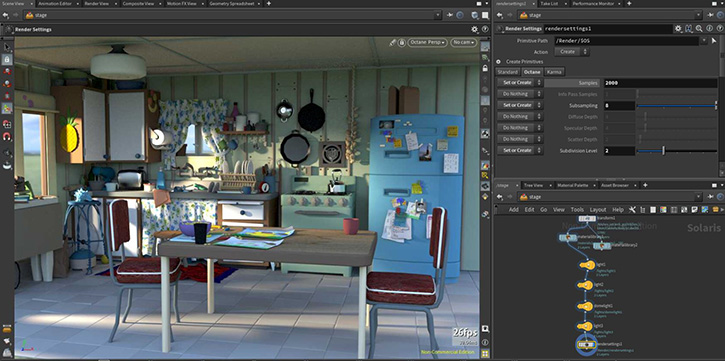
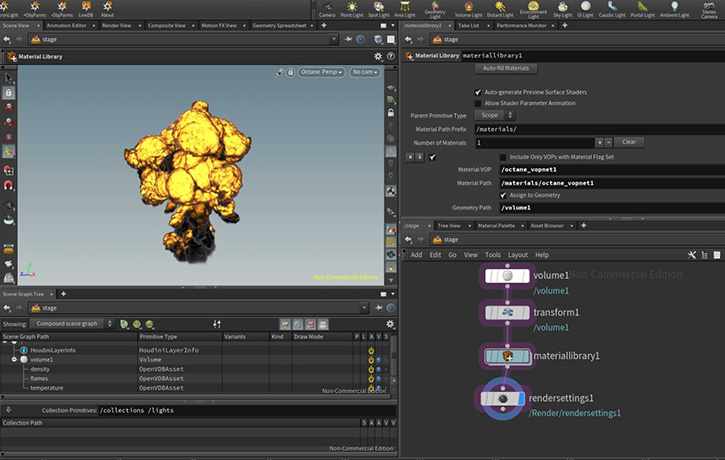
Image

Image

Pixar's USD pipeline
https://renderman.pixar.com/stories/pixars-usd-pipeline


-Installation steps-

Insert the OctaneRender® plugin folder path to the houdini.env file. Houdini®creates this file after launching it for the first time.
On Linux and macOS® systems, append a single line to enable OctaneRender®:

HOUDINI_PATH = "/path/to/octane;&"

On Windows® systems, you need to set the PATH to point to the plugin bin folder as well:

PATH = "C:/path/to/octane/bin;$PATH"


Setting this environment variable outputs any error related to loading the OctaneRender® plugin on the command line for diagnosing installation problems:
HOUDINI_DSO_ERROR = 2

-Houdnin Packages/json installation steps-

- Please create a folder inside Documents\houdini20.5 and name it as Packages
- Open notepad or any text editor and use these lines

Code: Select all

{
    "enable": true,
    "env": [
        {
            "OCTANE_AUTOSPAREPARAMS": {
                "value": 1
            }
        },
        {
            "OCTVERSION": "PATH_TO_OCTANE_SOLARIS_Win64 FOLDER"
        },
        {
            "HOUDINI_PATH": {
                "value": "$OCTVERSION"
            },
            "PATH": {
                "value": "$OCTVERSION\\bin"
            },
            "PXR_PLUGINPATH_NAME": {
                "value": "$OCTVERSION\\dso\\usd_plugins"
            }
        }
    ]
}
- Then Save as OctaneSolaris.json
- Please make sure to disable the .env paths

- or Please run **createPackageFileForOctane.bat** for the automatic Package installer for Windows OS and the shell script **createPackageFileForOctane.sh** for macOS and Linux.

New features
To learn more about the new features and improvements of OctaneRender 2026.1 and the Render Node app, please check out (Link )

Known issues
- Houdini app crashes when enabling Meshlet.
-Octane crashes for Houdini21 LinuxOS. We are reaching out to SideFX to help debug. [Fixed and replaced the download link]
- Missing features will be added asap

Change log since last release
  • - Unified with OctaneRender 2026.1 for Houdini production (2026.1.0.0) viewtopic.php?t=85382
  • - Fixed internal bug reports

Note: Click the link below to refer to the Important SOP to USD attribute conversion
https://www.sidefx.com/docs/houdini18.5/solaris/sop_import.html


Important notes:

[*] The minimum NVIDIA driver version required has been raised to R528 (R572 for GeForce RTX50 Series).
[*] The GPU version of Open Image Denoise is supported on Volta and Ada GPUs currently. The CPU version is used on devices with other models, and on macOS..
[*] The minimum version of macOS required is 14.5.[/b]

Linux Note
On Linux only default Houdini builds are supported.
This means that for Houdini 20.0, 20.5 and 21.0 gcc11.2 builds are supported.

Note: Please do not use Houdini 21.0.440 and 512 build for production yet. We are releasing it as an experimental release and to collect bug reports. Also, our macOS build for Houdini 21.0 crashes on startup. SideFx is helping us to resolve this issue asap


=================================
Subscription Studio+ Downloads
=================================

OctaneSolaris [macOS](Link)

OctaneSolaris [Linux](Link)

OctaneSolaris [Windows](Link)


=================================
Demo Downloads
=================================

OctaneSolaris [Windows](Link)

OctaneSolaris [Linux](Link)


Happy GPU Rendering !!


Your team
OTOY
Kind Regards

bk3d
User avatar
galleon27
Licensed Customer
Posts: 303
Joined: Wed Jul 15, 2015 11:55 am
Location: Serbia
Contact:

Why are particles still rendering as instanced sphere meshes and not as sphere particles?

You should be able to render millions of particles and be able to scrub through the timeline but not in Solaris... I've attached videos showing the difference between main plugin and solaris.
Attachments
solaris.mp4
(18.46 MiB) Downloaded 8 times
main_plugin.mp4
(8.11 MiB) Downloaded 9 times
Win 10 64bit // GTX 4090 + GTX 3090 // 5900x // 64GB // SideFX Houdini // C4D
User avatar
galleon27
Licensed Customer
Posts: 303
Joined: Wed Jul 15, 2015 11:55 am
Location: Serbia
Contact:

None of the MaterialX nodes work with Octane materials.

Screenshot 2026-01-08 031532.png
Win 10 64bit // GTX 4090 + GTX 3090 // 5900x // 64GB // SideFX Houdini // C4D
BK
OctaneRender Team
Posts: 1482
Joined: Mon Oct 31, 2016 7:54 pm

galleon27 wrote: Wed Jan 07, 2026 10:15 pm Why are particles still rendering as instanced sphere meshes and not as sphere particles?

You should be able to render millions of particles and be able to scrub through the timeline but not in Solaris... I've attached videos showing the difference between main plugin and solaris.
Thank you Galleon for reporting this issue.

We have an internal ticket for us to investigate! We hope to get it fixed asap!

Cheers
Kind Regards

bk3d
BK
OctaneRender Team
Posts: 1482
Joined: Mon Oct 31, 2016 7:54 pm

galleon27 wrote: Thu Jan 08, 2026 2:16 am None of the MaterialX nodes work with Octane materials.


Screenshot 2026-01-08 031532.png
Thank again Galleon,

We have been looking into this issue.
Will get it working for the next release.

cheers
Kind Regards

bk3d
BK
OctaneRender Team
Posts: 1482
Joined: Mon Oct 31, 2016 7:54 pm

galleon27 wrote: Thu Jan 08, 2026 2:16 am None of the MaterialX nodes work with Octane materials.


Screenshot 2026-01-08 031532.png
Hi Galleon,

It seems we support the USD MaterialX builder straight away!!
Could you please give it a go and let us know while we're investigating?

Cheers
Kind Regards

bk3d
User avatar
galleon27
Licensed Customer
Posts: 303
Joined: Wed Jul 15, 2015 11:55 am
Location: Serbia
Contact:

BK wrote: Thu Jan 08, 2026 4:13 am
galleon27 wrote: Thu Jan 08, 2026 2:16 am None of the MaterialX nodes work with Octane materials.


Screenshot 2026-01-08 031532.png
Hi Galleon,

It seems we support the USD MaterialX builder straight away!!
Could you please give it a go and let us know while we're investigating?

Cheers
I tested that and it works fine. They just don't work with Octane materials


Can you also investigate how to use displacement with MaterialX builder?
This is the way to do it in Karma. That doesn't work with Octane and i don't see another way to do it.
Screenshot 2026-01-08 120646.png

It seems that MtlX Standard Surface/OpenPBR Surface have a pin for displacement in Standalone but that is not the case in Houdini.
Screenshot 2026-01-08 122323.png
This is not an issue only in Solaris but also in the main plugin.
Win 10 64bit // GTX 4090 + GTX 3090 // 5900x // 64GB // SideFX Houdini // C4D
BK
OctaneRender Team
Posts: 1482
Joined: Mon Oct 31, 2016 7:54 pm

galleon27 wrote: Thu Jan 08, 2026 10:44 am
BK wrote: Thu Jan 08, 2026 4:13 am
galleon27 wrote: Thu Jan 08, 2026 2:16 am None of the MaterialX nodes work with Octane materials.


Screenshot 2026-01-08 031532.png
Hi Galleon,

It seems we support the USD MaterialX builder straight away!!
Could you please give it a go and let us know while we're investigating?

Cheers
I tested that and it works fine. They just don't work with Octane materials


Can you also investigate how to use displacement with MaterialX builder?
This is the way to do it in Karma. That doesn't work with Octane and i don't see another way to do it.
Screenshot 2026-01-08 120646.png


It seems that MtlX Standard Surface/OpenPBR Surface have a pin for displacement in Standalone but that is not the case in Houdini.
Screenshot 2026-01-08 122323.png

This is not an issue only in Solaris but also in the main plugin.
Hi Galleon,

Thank you so much for sharing the Karma workflow.
We will check with our developer if we can keep the same workflow.


cheers
Kind Regards

bk3d
Post Reply

Return to “Releases”
