

Need Wisdom, 6 GPU server?
Forum rules
Please add your OS and Hardware Configuration in your signature, it makes it easier for us to help you analyze problems. Example: Win 7 64 | Geforce GTX680 | i7 3770 | 16GB
Please add your OS and Hardware Configuration in your signature, it makes it easier for us to help you analyze problems. Example: Win 7 64 | Geforce GTX680 | i7 3770 | 16GB


Smicha! Thank You!!! that comes to my mod list =) as after hooking Noctuas in the case I do hear PSU =) that will be awesome!..never thought of this apart from changing entire PSU =p

Glimpse,
I looked carefully at the video - the guy is soldering. So tomorrow morning I go and get a soldering machine.
I looked carefully at the video - the guy is soldering. So tomorrow morning I go and get a soldering machine.
3090, Titan, Quadro, Xeon Scalable Supermicro, 768GB RAM; Sketchup Pro, Classical Architecture.
Custom alloy powder coated laser cut cases, Autodesk metal-sheet 3D modelling.
build-log http://render.otoy.com/forum/viewtopic.php?f=9&t=42540
Custom alloy powder coated laser cut cases, Autodesk metal-sheet 3D modelling.
build-log http://render.otoy.com/forum/viewtopic.php?f=9&t=42540
yeah I saw, but it's no problem, He's just connecting some wires =)smicha wrote: I looked carefully at the video - the guy is soldering. So tomorrow morning I go and get a soldering machine.
no need to solder but he does that anyway =)
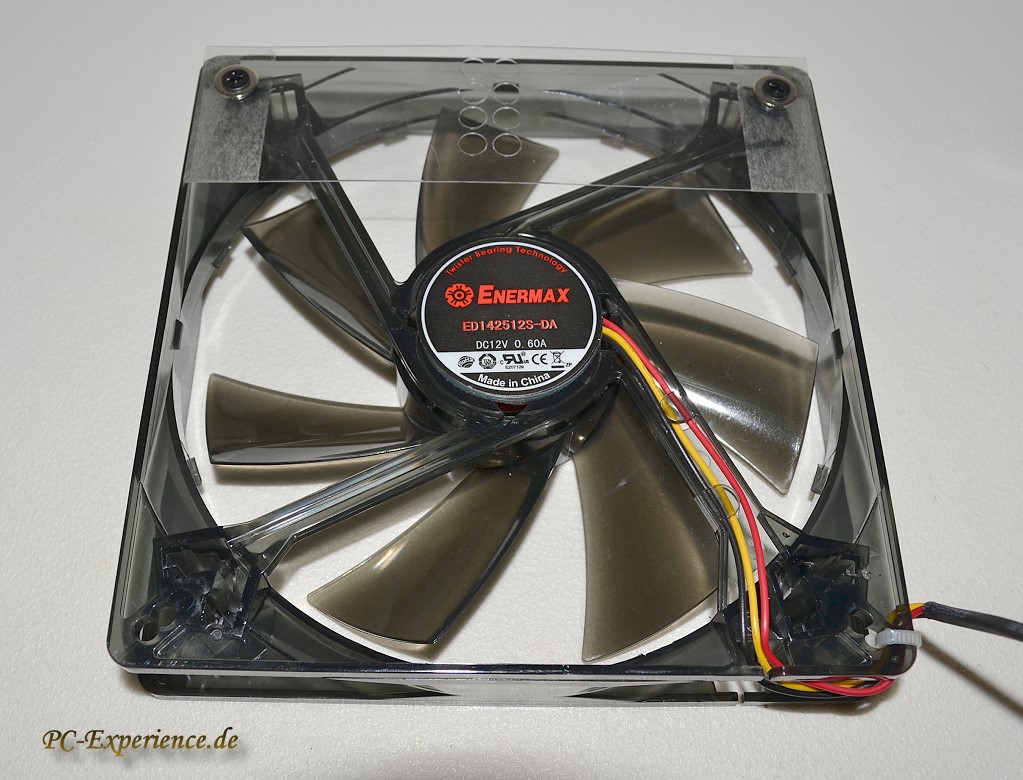
I must do some more research tomorrow - how to connect these three cables
http://www.pc-experience.de/Bilder-Revi ... evo.13.jpg
to noctua cables
Any help is appreciated
http://www.pc-experience.de/Bilder-Revi ... evo.13.jpg
to noctua cables
Any help is appreciated
3090, Titan, Quadro, Xeon Scalable Supermicro, 768GB RAM; Sketchup Pro, Classical Architecture.
Custom alloy powder coated laser cut cases, Autodesk metal-sheet 3D modelling.
build-log http://render.otoy.com/forum/viewtopic.php?f=9&t=42540
Custom alloy powder coated laser cut cases, Autodesk metal-sheet 3D modelling.
build-log http://render.otoy.com/forum/viewtopic.php?f=9&t=42540
are You going to wire one into mono for fan monitoring? =) the guy in the link You've send has other video where he explains =) I'll probably do that way =) it's good to have some monitoring..smicha wrote:I must do some more research tomorrow - how to connect these three cables
http://www.pc-experience.de/Bilder-Revi ... evo.13.jpg
to noctua cables
Any help is appreciated

it's one of solutions.. is it bad? No.. is the best? No.. it's just one of options & it depends from You whether that fit's Your needs or not.Oleg wrote:So you guys refused to use PCIe to USB riser idea?
long story short, if You want to build cheap (as little as possible to spend for platform..) using 1x & usb conected cards is a solution - & if You're rendering mostly stills (upload once & then crunching for hours) that's a good way to go.. as it doesn't effect render speed, just uploads =) it just might be a bit of problem if You're making animations, & upload more regularly, heavy scenes.. - that might not perform good..
pluss one thing to keep in mind. Every added detail in the path of signal is another point to fail..- some risers fail.. some ribbon cables give blue screens - that's already been reported.. & why buy 4 cards, when You can buy 3? why use extra complexity in signal path or make bottlenecks? (some might plan a rig for variety of workloads..) - then keeping things simple, & spending extra money on performance enhancing parts start making sense..unless.. You trying to save money, cut corners (then making trade off might be a solution, possible way - You simply need to know what You give away).
& again, it's no good or bad.. just solution that fit or don't in Your case =)
Thank you, rendering heavy scenes and animation is my main goal... So I need probably to find another way to connect additional cards to PC. Maybe it should be some x8 or x16 risers I saw here.glimpse wrote:it's no good or bad.. just solution that fit or don't in Your case =)
use 1x cables only if You have cheep mobo, If You spend a more for it, use 16 to 16 ribbon cables - wider ones cables, as those not so wide are 1x or 4x to 16x..& that's a waste of your investment that You put into mobo..unless You intensionally go for multi 1x.Oleg wrote:Thank you, rendering heavy scenes and animation is my main goal... So I need probably to find another way to connect additional cards to PC. Maybe it should be some x8 or x16 risers I saw here.
as a rule of thumb here pcie gen2 8x or pcie gen3 4x is recommended as minimum if You plan to build a workstation.

Well it finally arrived!
We decided to go with a MAINGEAR purchase.
Here are the important specs
4x 980 no OC (yet)
i7-5930k
16GB Corsair vengeance DDR4
The build quality is really really impressive! We paid extra of course to have a 3rd party build this, but my company felt it was worth the piece of mind knowing if something fails we have someone to call and replace parts!
I knew this thing would be big but man! it is huge!
Benchmarking using standalone 2.11.1
DL 70.4
PT 18.5
Disappointing really... as far as Ms/s I am hoping that something will change and know I took a gamble going the 980 route. Please Otoy make it all better!
Temps have never gone above 43 C
We decided to go with a MAINGEAR purchase.
Here are the important specs
4x 980 no OC (yet)
i7-5930k
16GB Corsair vengeance DDR4
The build quality is really really impressive! We paid extra of course to have a 3rd party build this, but my company felt it was worth the piece of mind knowing if something fails we have someone to call and replace parts!
I knew this thing would be big but man! it is huge!
DL 70.4
PT 18.5
Disappointing really... as far as Ms/s I am hoping that something will change and know I took a gamble going the 980 route. Please Otoy make it all better!
Temps have never gone above 43 C