OctaneRender for DAZ Studio 2025.6.0 - 405 [Stable] [OBSOLETE]
Posted: Mon Apr 13, 2026 11:07 pm
This is the recommended thread for downloading, and posting any questions, suggestions or support queries for OctaneRender for DAZ Studio - TEST (ie. pre-release) and STABLE releases.
SOLUTIONS TO COMMON ISSUES
1) Make sure your NVIDIA drivers are up to date.
2) Make sure you are running the latest version of the OctaneRender for DAZStudio plugin.
3) If you experience a DAZStudio crash - deleting C:\Users\[username]\OctaneRender\Data\OctaneRender_settings.oczdb may resolve the issue.
This also resolves the "COULD NOT INITIALISE IN-MEMORY DB!" error on startup and a number of other issues.
4) If the Save button is disabled when using the Final button - disable the Final button and in Render settings select the SuperScope (2:1) Size / aspect ratio and drag the Viewport height or width until you reach required resolution.
5) If rendering an animation fails after 11 frames - make sure the DAZStudio viewport is visible when you render the animation.
6) If Octane materials are not loading when you load a previously saved scene - tick Preferences->Load OctaneRender materials from .duf user presets. If ticking this option does not stick between DAZStudio restarts, delete OctaneRender_settings.oczdb as per NOTE 3 above.
7) If you get a "Could not save a frame for X times!" - please search the forum for potential solutions.
8) If you get a "Bogus Scene Path" error - this is due to having an apostrophe in the filepath of a texturemap (so store your textures in foldernames which do not have apostrophes).
9) Octane panel title bar is off the screen and cannot be closed - click anywhere on the Octane panel and then press Alt-F4.
10) Rendering animation results in the scene emitter intensities changing - this is because rendering animations is done in "Final" mode, where meshes are merged. To resolve this, UNTICK the Preferences->Use Combined Mesh, or ENABLE the Surface Brightness pin on each of the emission materials in the scene.
11) Denoiser is not working - make sure you have a graphics card selected for Denoising in the System tab->Open Device Settings window, and that you are using the Path Tracing kernel.
12) Render artifacts near eyebrows - this is due to the eyebrow geometry going inside the head mesh surface. So morph, move or scale the eyebrows so they do not intersect with the head mesh.
13) Octane panes do not appear on the screen (ie. they open off the screen) - Main Menu Bar->Window->Workspace->Select Layout->Accept (you might choose a different layout to the current layout to make this work).
KNOWN ISSUES AWAITING RESOLUTION
1) Panoramic camera and OSL nodes are not currently supported.
2) Templating is not currently working for specular and roughness maps from Iray materials. - FIXED (please report any issues)
3) UDIM Tiles are not currently supported. - FIXED (please report any issues)
4) Some of the newer OctaneRender material and texture types are not supported. - FIXED (please report any issues)
5) VDB volume and volumetric spotlight nodes are not currently supported.
DAZ Studio Version
DAZ Studio 4.8 or later on Windows 8, 10 or 11 64bit
Important notes:
[*] The minimum NVIDIA driver version required is R528 (R572 for GeForce RTX50 Series)..
Network Rendering
For Network Rendering, you must use the OctaneRender Studio+ Node release from the Octane Standalone forums/download page which matches the exact Octane version of the plugin you are using. This version matches OctaneRender Studio+ 2025.6 Render Node builds.
Support Issues
If you have a support issue, pls provide the following information:
- Operating System (ie. Win 8, 10, 11)
- Amount of RAM
- Graphics Card(s) - model (ie. GTX 580, 3GB)
- Nvidia driver version
- DAZ Studio version
- The most important part of resolving a problem is being able to reproduce that problem. So please provide as much detail as possible in order for me to do this, and if the problem is specific to the scene, send me the scene.
Change logs
FAQ
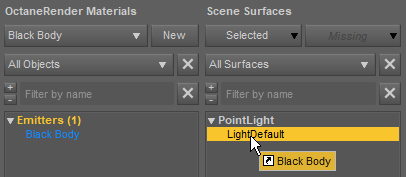
Q: How to change light brightness/color?
A: You need to assign a material to the light and adjust the emission of the material. You can do it either by dragging a material to the light in the Materials tab (similar to assigning materials to geometry) or by right clicking on the light and selecting menu item under "Create as new light source".
Q: How do I enable analytic light?
A: Create a point light (or linear point light, they are the same). Then turn on "use analytic light" in the OctaneRender settings.

Q: I selected "rectangle" light geometry, but light didn't change
A: "rectangle", "disc" and "cylinder" geometries are only supported for analytic lights
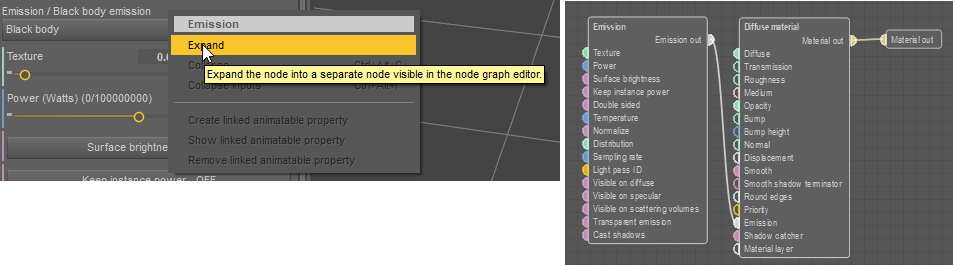
Q: I assigned emission material to the light, but it's still not visible
A: If the light is analytic, make sure the emission node is expanded (i.e. is a separate node, connected to emission pin). It's required for analytic lights to work.
Q: How to make light beams work?
A: 1) Set the light to be analytic, rectangle or disc shape, enable "use in post volume".
2) In render settings enable post processing and light beams
Download Links
Please feel free to report any issues you encounter.
Happy rendering
Your OTOY team
SOLUTIONS TO COMMON ISSUES
1) Make sure your NVIDIA drivers are up to date.
2) Make sure you are running the latest version of the OctaneRender for DAZStudio plugin.
3) If you experience a DAZStudio crash - deleting C:\Users\[username]\OctaneRender\Data\OctaneRender_settings.oczdb may resolve the issue.
This also resolves the "COULD NOT INITIALISE IN-MEMORY DB!" error on startup and a number of other issues.
4) If the Save button is disabled when using the Final button - disable the Final button and in Render settings select the SuperScope (2:1) Size / aspect ratio and drag the Viewport height or width until you reach required resolution.
5) If rendering an animation fails after 11 frames - make sure the DAZStudio viewport is visible when you render the animation.
6) If Octane materials are not loading when you load a previously saved scene - tick Preferences->Load OctaneRender materials from .duf user presets. If ticking this option does not stick between DAZStudio restarts, delete OctaneRender_settings.oczdb as per NOTE 3 above.
7) If you get a "Could not save a frame for X times!" - please search the forum for potential solutions.
8) If you get a "Bogus Scene Path" error - this is due to having an apostrophe in the filepath of a texturemap (so store your textures in foldernames which do not have apostrophes).
9) Octane panel title bar is off the screen and cannot be closed - click anywhere on the Octane panel and then press Alt-F4.
10) Rendering animation results in the scene emitter intensities changing - this is because rendering animations is done in "Final" mode, where meshes are merged. To resolve this, UNTICK the Preferences->Use Combined Mesh, or ENABLE the Surface Brightness pin on each of the emission materials in the scene.
11) Denoiser is not working - make sure you have a graphics card selected for Denoising in the System tab->Open Device Settings window, and that you are using the Path Tracing kernel.
12) Render artifacts near eyebrows - this is due to the eyebrow geometry going inside the head mesh surface. So morph, move or scale the eyebrows so they do not intersect with the head mesh.
13) Octane panes do not appear on the screen (ie. they open off the screen) - Main Menu Bar->Window->Workspace->Select Layout->Accept (you might choose a different layout to the current layout to make this work).
KNOWN ISSUES AWAITING RESOLUTION
1) Panoramic camera and OSL nodes are not currently supported.
2) Templating is not currently working for specular and roughness maps from Iray materials. - FIXED (please report any issues)
3) UDIM Tiles are not currently supported. - FIXED (please report any issues)
4) Some of the newer OctaneRender material and texture types are not supported. - FIXED (please report any issues)
5) VDB volume and volumetric spotlight nodes are not currently supported.
DAZ Studio Version
DAZ Studio 4.8 or later on Windows 8, 10 or 11 64bit
Important notes:
[*] The minimum NVIDIA driver version required is R528 (R572 for GeForce RTX50 Series)..
Network Rendering
For Network Rendering, you must use the OctaneRender Studio+ Node release from the Octane Standalone forums/download page which matches the exact Octane version of the plugin you are using. This version matches OctaneRender Studio+ 2025.6 Render Node builds.
Support Issues
If you have a support issue, pls provide the following information:
- Operating System (ie. Win 8, 10, 11)
- Amount of RAM
- Graphics Card(s) - model (ie. GTX 580, 3GB)
- Nvidia driver version
- DAZ Studio version
- The most important part of resolving a problem is being able to reproduce that problem. So please provide as much detail as possible in order for me to do this, and if the problem is specific to the scene, send me the scene.
Change logs
- Integrated a 2025.6 rendering engine.
- Some improvements in Node Editor UI readability.
- Node editor UI-functionality improvements, collapsable groups' headers are properly clickable now.
- Completely reworked the broken map-picking UI helper for sun direction. Now it doesn't rely on Google services and network presence and can work offline.
- Fixed sun-direction's "Now" helper button: the wrong time value was calculated.
- Fixed Octane global settings and Octane Pane state were not saved between sessions.
- Fixed a major bug of all previous versions with rotation issue when exceeding 90 degrees.
- Fixed some image-textures' file-paths were messed up after saving a scene file (after they were just set up correctly) and reopening it. You will still need to fix the texture-paths one last time if you open the previous versions' broken scene files in this new version, and re-save them. After this these old scenes will open with correct paths.
- Fixed live-render camera navigation broke after enabling "following DAZ camera autofocus".
- Fixed rendersettings management dialog bug, Delete button was not working properly.
- Fixed materials conversion bug (empty enums in Mix materials).
- Fixed a fluctuating crash sometimes happening when closing DAZ.
- Improved installer functionality, now it finds the DAZ installation-path automatically.
- Minor bug fixes and improvements...
FAQ
Q: How to change light brightness/color?
A: You need to assign a material to the light and adjust the emission of the material. You can do it either by dragging a material to the light in the Materials tab (similar to assigning materials to geometry) or by right clicking on the light and selecting menu item under "Create as new light source".
Q: How do I enable analytic light?
A: Create a point light (or linear point light, they are the same). Then turn on "use analytic light" in the OctaneRender settings.
Q: I selected "rectangle" light geometry, but light didn't change
A: "rectangle", "disc" and "cylinder" geometries are only supported for analytic lights
Q: I assigned emission material to the light, but it's still not visible
A: If the light is analytic, make sure the emission node is expanded (i.e. is a separate node, connected to emission pin). It's required for analytic lights to work.
Q: How to make light beams work?
A: 1) Set the light to be analytic, rectangle or disc shape, enable "use in post volume".
2) In render settings enable post processing and light beams
Download Links
- For users with a Studio+ subscription license For users with a Prime/Free Tier license
Please feel free to report any issues you encounter.
Happy rendering
Your OTOY team

