Page 1 of 1
Batch render no more than 120fps?
Posted: Sun May 29, 2016 4:38 pm
by doca
Hi, I have a problem, or I am doing something wrong. I do have animation in a 200fps or more. In a scene I can easily set that framerate, but when I want to render sequence, there is only aviablility to set batch render fps up to 120. Is that some kind of limitation or what? Octane standalone.
Best,
Doca
Re: Batch render no more than 120fps?
Posted: Mon May 30, 2016 7:25 am
by bepeg4d
Hi doca,
probably something goes wrong when octane try to read the animation settings (fps, ecc) from the alembic file

What Octane version are you using?
What is your host app?
Could you share a simple file that shows the issue?
ciao beppe
Re: Batch render no more than 120fps?
Posted: Mon May 30, 2016 9:50 am
by doca
Hello, here is the screenshot:
 image
image
I exported alembic from softimage and in Octane scene everything works fine. But in batch render I can set only 120fps as maximum framerate to render. Even if I type 200 in framerate it drops back to 120fps. Is that limitation or just interface preference?
One offtopic thing, is there a way to offset alembic animation time?
Best,
Doca
Re: Batch render no more than 120fps?
Posted: Mon May 30, 2016 10:33 am
by bepeg4d
Hi doca,
sorry, you are right, the batch script has a limit of 120fps.
You can open the script in the editor and change the limit at line 432, or you can use the attached modified version that has the limit at 1200fps:
ciao beppe
Re: Batch render no more than 120fps?
Posted: Mon May 30, 2016 1:35 pm
by doca
Thank you Beppe. I can run your script, but as I am not so familiar with scripts (I am back to Octane after few years), is there a way to change batch script permanently (or where to find default batch script)?
Re: Batch render no more than 120fps?
Posted: Tue May 31, 2016 9:35 am
by bepeg4d
Hi daco,
you can inspect and modify the internal batch script by clicking the "Inspect Octane script" buttton in the Script Editor:
But you have to save it in a different location if modified, possibly in your script folder that you can specify in Preferences/Application:
In this way, the modified script will appear in the Script menu just below the internal ones:
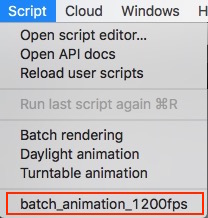
- ScriptMenu.jpg (23.39 KiB) Viewed 1833 times
ciao beppe
Re: Batch render no more than 120fps?
Posted: Tue May 31, 2016 10:58 am
by doca
Well, that's what I was looking for!
Thank you very much Beppe!!!