Page 1 of 3
Scatter node help
Posted: Sat Jan 31, 2015 2:08 pm
by justix
hi, sorry this is a noob question but as I'm fully back on working with Octane I'm testing the scatter node and now exporting a scatter CSV matrix file from Rhino (rhinogrow) to import it into Octane BUT as I would apply the scattering onto an object I found no tutorials on the subject apart from the placement one BUT it does not touch the scatter node (?) I can load the scatter node and from within load the csv file, then connect an obj to it but cannot see the result, is this scattering node applyable as a material? i'm confused
Re: Scatter node help
Posted: Sat Jan 31, 2015 3:49 pm
by Phantom107
Here's an image from my website:

So basically you connect your OBJ to the Scatter node, and then combine them all in a Geometry Group. When you click on the Scatter node, you should import your CSV file.
Re: Scatter node help
Posted: Sat Jan 31, 2015 4:51 pm
by justix
Phantom107 wrote:Here's an image from my website:
So basically you connect your OBJ to the Scatter node, and then combine them all in a Geometry Group. When you click on the Scatter node, you should import your CSV file.
Hi Phantom, thanks for your reply, I do actually own a license of your Scattering Softare too...

but to cut it short, I did actually tried to read through the examples off your folder from the latest update but my scenario is as follow, simple and neat..a carpet in a room... I should try to follow your example once more to import a scattering to apply the selected obj as I normally do with a material...
I would normally use 3dsMax for it BUT I do love the standalone and love to be able to use it properly....
Re: Scatter node help
Posted: Sat Jan 31, 2015 5:05 pm
by Phantom107
Aha

It should be pretty straightforward. There another user who made a carpet using Phantom Scatter:

1. Create a model of the base of the carpet.
2. Export the carpet OBJ.
3. Import the carpet in Phantom Scatter. Create a dense AREA scatter.
4. Export the CSV file.
5. In Octane Render, load in the carpet OBJ.
6. In Octane Render, load in a 'fluffy' model for the things on the carpet...no clue what that those are called.
7. Create a Scatter node and import the CSV file. Hook the 'fluffy' model up to the Scatter node.
8. Now use a Geometry Group to combine the base carpet model and scatter into 1.
Hope that helps
Re: Scatter node help
Posted: Sat Jan 31, 2015 5:31 pm
by justix
ill desperately try... (got an out of memory on a 218kb obj import now... maybe an internal glitch..) will update..thanks
Re: Scatter node help
Posted: Sat Jan 31, 2015 6:03 pm
by justix
ok, definitely a wrong obj halting the softare..now used a different exporting settings and it seems working...silly question...were the CSV file is actually exported? I can't see it from the folder I'm loading the obj which is a custom folder set in your software were to import export..sorry I'm a pain

Re: Scatter node help
Posted: Sun Feb 01, 2015 12:10 am
by Phantom107
In the IMPORT/EXPORT panel, look for the setting DIRECTORY. If that is set to 'OBJ', it will export the file in the same folder as your OBJ. If set to 'CUSTOM', then you previously defined it to be somewhere.
Re: Scatter node help
Posted: Sun Feb 01, 2015 4:23 pm
by justix
Phantom107 wrote:In the IMPORT/EXPORT panel, look for the setting DIRECTORY. If that is set to 'OBJ', it will export the file in the same folder as your OBJ. If set to 'CUSTOM', then you previously defined it to be somewhere.
will pack the obj file to work ith as I have troubles in orking it properly..rhino suck in exporting it the way your software likes it and even Max need adjustment in exporting, manage to get some instances exported BUT on Octane 1.5.2 (still) the scatter file entered do not stick to the object.. hard to explain...ill prepare screenshots
Re: Scatter node help
Posted: Tue Feb 03, 2015 10:48 am
by justix
Hi phantom, following your first tutorial I did what explained as it is really straight forward except for the too many OBJ problems I have exporting it from rhino AND from 3dMax, anyway..using your files from the tutorial folder I cannot still get any result as you can see from the picture, am I missing something? scene attached
- scene.zip
- your tutorial scene complete
- (118.45 KiB) Downloaded 166 times
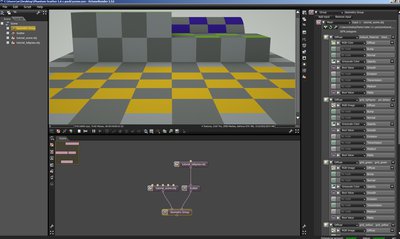
- This is what I get, maybe a 1.5.2 problem? will update today and see what I get
Re: Scatter node help
Posted: Tue Feb 03, 2015 11:29 am
by Phantom107
That is weird, they are not showing up here either. I think there is something else going on... any opportunity to livestream somewhere? Then you can PM me the link and I'll have a look at the workflow and where it goes wrong.