Page 1 of 2
Octane constantly crashing during 'Export Materials'
Posted: Thu Sep 30, 2021 11:58 pm
by MindofImpact
Octane constantly crashes after hitting render on the live viewer and stays stuck at 'Export Material'.
No bug report and no pop-up crash box, I have to force close C4D each time.
I've tried multiple Octane versions from 2020 to the experimental 2021 versions and multiple of the latest Studio and Game Ready drivers.

- Screenshot_8135.png (1.58 KiB) Viewed 3100 times
Re: Octane constantly crashing during 'Export Materials'
Posted: Fri Oct 01, 2021 6:32 am
by bepeg4d
What about a c4doctanelog.txt?
Please, open the scene, then go to c4doctane Settings/Log Output tab, and enable all the Log option checkboxes.
Then, load the scene in Live View, then in Picture Viewer, or until crash, then reopen c4d, navigate to c4doctane Settings/Log Output tab, press the
Generate log report button, and share the resulting
octanelog_report.zip file, thanks.
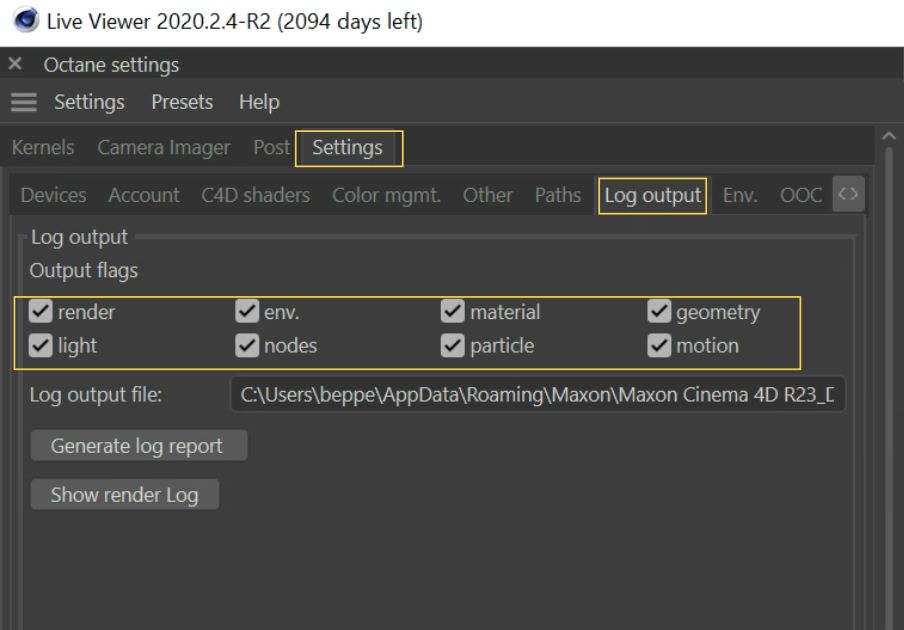
ciao Beppe
Re: Octane constantly crashing during 'Export Materials'
Posted: Fri Oct 01, 2021 8:17 am
by aoktar
You may have some material content which causes crashes if you are using multithreading for materials. Disable "multi-threading for materials" option and try again.
Re: Octane constantly crashing during 'Export Materials'
Posted: Fri Oct 01, 2021 11:17 am
by MindofImpact
bepeg4d wrote:What about a c4doctanelog.txt?
Please, open the scene, then go to c4doctane Settings/Log Output tab, and enable all the Log option checkboxes.
Then, load the scene in Live View, then in Picture Viewer, or until crash, then reopen c4d, navigate to c4doctane Settings/Log Output tab, press the
Generate log report button, and share the resulting
octanelog_report.zip file, thanks.
ciao Beppe
Thanks for the quick response. Attached are two log reports, 1 where I try with Live viewer and it freezes and the another when I try and render to Picture viewer and it crashes with a pop-up.
Re: Octane constantly crashing during 'Export Materials'
Posted: Fri Oct 01, 2021 11:20 am
by MindofImpact
aoktar wrote:You may have some material content which causes crashes if you are using multithreading for materials. Disable "multi-threading for materials" option and try again.
I've tried with it ticked on and off, same result.
Re: Octane constantly crashing during 'Export Materials'
Posted: Fri Oct 01, 2021 12:43 pm
by aoktar
MindofImpact wrote:aoktar wrote:You may have some material content which causes crashes if you are using multithreading for materials. Disable "multi-threading for materials" option and try again.
I've tried with it ticked on and off, same result.
Then you have to do some optimizations. Try to delete some of materials until find the reason.
Re: Octane constantly crashing during 'Export Materials'
Posted: Fri Oct 01, 2021 1:12 pm
by MindofImpact
These are pretty simple scenes with simple materials there's no reason why they should be crashing the render. I've tried with all materials removed and it still crashes.
Re: Octane constantly crashing during 'Export Materials'
Posted: Sun Oct 03, 2021 12:27 am
by MindofImpact
bepeg4d wrote:What about a c4doctanelog.txt?
Please, open the scene, then go to c4doctane Settings/Log Output tab, and enable all the Log option checkboxes.
Then, load the scene in Live View, then in Picture Viewer, or until crash, then reopen c4d, navigate to c4doctane Settings/Log Output tab, press the
Generate log report button, and share the resulting
octanelog_report.zip file, thanks.
ciao Beppe
Did you find anything from looking at the logs..?
Re: Octane constantly crashing during 'Export Materials'
Posted: Mon Oct 04, 2021 7:06 am
by bepeg4d
Hi MindofImpact,
please upgrade c4doctane to v2020.2.5-R3, and report back.
You can find it by visiting your personal Downloads area:
https://render.otoy.com/account/download_archive.php
ciao Beppe
Re: Octane constantly crashing during 'Export Materials'
Posted: Mon Oct 04, 2021 5:22 pm
by MindofImpact
I Upgraded, worked for a little while then started crashing again. It seems like once it starts affecting a scene that scene won't work again until I transfer the entire scene to a new C4D document.
Attached bug report. This is seriously holding me back now.