Page 1 of 1
Rounded edges + Motion Blur
Posted: Tue Jan 12, 2016 3:20 pm
by seltzdesign
I have been running into a very specific but annoying thing I can't figure out.
I am exporting an animation that consists of 1 .obj file for each frame as an Alembic file from Cinema4D. Everything is working as expected except for the motion blur and rounded edges.
To get the rounded edges I have to weld the objects in the .obj, which works, but then I don't have any more motion blur. If I don't weld then I get the motion blur, but no rounded edges.
Is there a way to get both? Is it a limitation of Octane? Any ideas what could be happening?
Here is a screenshot of rounded edges working:

Here is the same unwelded alembic file with motion blur but no round edges (note the blur of the box going from bottom middle to top right):

I am running Octane 2.24.2 on Windows 7 x64 on an iMac 27" with GTX 780M and network rendering.
Thank you!
Re: Rounded edges + Motion Blur
Posted: Wed Jan 13, 2016 4:49 pm
by bepeg4d
Hi,
I have made a test and here is working as expected

I have exported some animated polygons from c4d to standalone in alembic format and here is what I got (values are a bit exaggerated to better catch the effect):
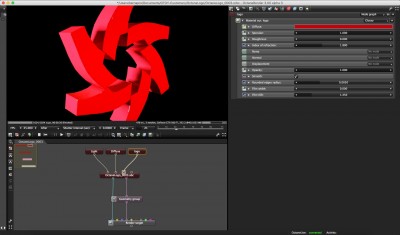
- rounded edges with motion blur disabled
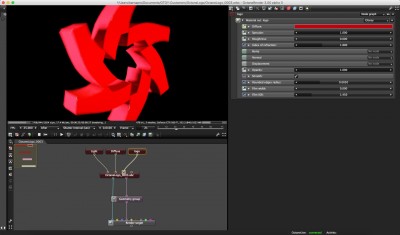
- rounded edges with motion blur enabled
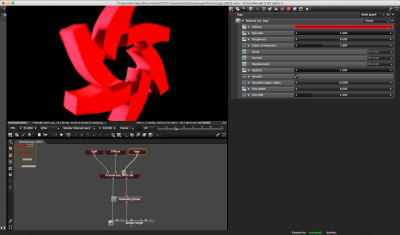
- rounded edges disabled with motion blur enabled
Maybe there is something strange in the original obj?
Are you using Riptide Pro to import the animated objs in c4d?
ciao beppe
Re: Rounded edges + Motion Blur
Posted: Thu Jan 14, 2016 12:53 pm
by seltzdesign
@bepeg4d
Thanks for your reply and your test. Yes, I would have assumed that it would do both as well.
I am not using Riptide Pro - I am using SteadyBake's Xplay (
http://tcastudios.com/?p=19), to import the .obj animation and have it using Xrefs. I will try to use Riptide if it has animation support.
The .obj itsself is coming from Rhino, where I can either have the mesh as is (in my case motion blur works then) or I can weld the mesh (which enables having rounded corners). What is strange though, is that the welded mesh looks really weird in C4D, as if the Normals are flipped or something - the shading is just really weird, like this:

If I check normals and so on in Rhino everything is as it should be though.
So I am guessing that this is also the cause for it not working. How did you prepare the mesh in C4D, so that you can get the edge rounding?
Re: Rounded edges + Motion Blur
Posted: Thu Jan 14, 2016 2:10 pm
by seltzdesign
Update:
Ok, the weird shading is due to the normals actually not being correct. If I open one of the frames in Cinema 4D, each object has a normals tag. if i delete the normals tag they display properly.
Continuing with lots of tests to finally get the results i am after (rounded edges + motion blur).
Re: Rounded edges + Motion Blur
Posted: Thu Jan 14, 2016 2:11 pm
by bepeg4d
Hi,
I see this kind of effect when the imported mesh does not have a phong tag on it. If this is the case, create a phong tag with a 20°/40° angle value. The wrong shading effect should go away and you could try to export again to standalone to see if the issue is solved
ciao beppe
Re: Rounded edges + Motion Blur
Posted: Thu Jan 14, 2016 3:55 pm
by seltzdesign
Well I have now found the error for the wrong shading and get the proper shading now.
I have tried all combinations of settings to see if they make a difference, but I still only ever get Rounded Egdes OR Motion Blur (depending on wether the mesh is welded or not), but never both.

I actually I CAN get both to work if I use Riptide Pro to import one of the frames of a welded .obj, then animate one of the objects in it and export as alembic I can get rounded edges AND motion blur:

But of course thats not what I want, as each frame of the animation has to be its own .obj file (the geometry itself is actually changing). But then Riptide doesn't support importing obj-animations. I have another plugin called ObjSequenceImporter, that imports each .obj into cinema and then sets the visibility to on for just one frame each using an Xpresso Tag. But that doesn't export as alembic, because I would have to bake the Xpresso as Keyframes first, which I dont know how. You wouldn't happen to know such a thing?