Page 1 of 1
How to turn off HDRI visibility
Posted: Thu Dec 10, 2015 7:50 pm
by RouseandFable
Hey guys,
I posted this question in another section but didn't get much response so trying to get some help here. know this is a newbie question and i believe i've done it before. I have an octane sky with an HDRI image which i want to light my object but i don't want to see the image in the background. Is there a way to turn off the HDRI background but still have it light the scene? I tried to turn off the camera visibility which did nothing. I added a compositing tag and turned off camera visibility there as well but it didn't do anything either. Trying to figure out what it is that i'm missing.
Re: How to turn off HDRI visibility
Posted: Thu Dec 10, 2015 7:55 pm
by grimm
Hi,

We need some more information, are you using standalone or a plugin (and which one)? The answer can be very different depending on this info.
Re: How to turn off HDRI visibility
Posted: Thu Dec 10, 2015 10:02 pm
by RouseandFable
Hi there,
I'm using the plugin in Cinema 4D, the version is 2.16.2. Thanks!
Re: How to turn off HDRI visibility
Posted: Thu Dec 10, 2015 10:56 pm
by grimm
This is better asked in the C4D plugin forum, but I did find this thread that might help:
viewtopic.php?f=30&t=51433&hilit=hdri
Re: How to turn off HDRI visibility
Posted: Fri Dec 11, 2015 5:11 am
by senorpablo
It's not possible except by composting it in 2D after the fact.
This functionality has been requested numerous times.
Re: How to turn off HDRI visibility
Posted: Fri Dec 11, 2015 5:16 am
by RouseandFable
I should have done a search but figured it out, thanks
Re: How to turn off HDRI visibility
Posted: Fri Dec 11, 2015 5:38 am
by grimm
paulforgy wrote:It's not possible except by composting it in 2D after the fact.
This functionality has been requested numerous times.
That's really strange because the Blender plugin can do it, and the same settings are used that aoktar specified in the thread I linked to.
Here is the rendered file so you can check and see if it works for what you need:
Here is the scene rendered with the hdri not set to alpha:
Re: How to turn off HDRI visibility
Posted: Sat Dec 12, 2015 4:00 am
by senorpablo
grimm wrote:paulforgy wrote:It's not possible except by composting it in 2D after the fact.
This functionality has been requested numerous times.
That's really strange because the Blender plugin can do it, and the same settings are used that aoktar specified in the thread I linked to.
alphahdri3.png
Here is the rendered file so you can check and see if it works for what you need:
alphahdri1.png
Here is the scene rendered with the hdri not set to alpha:
alphahdri2.png
Right. That would work for 2D compositing, like I said.
But, can you put something else in the background such as another image? If so, that would be great. As far as I know that's not possible, and that's what people like myself have requested.
Re: How to turn off HDRI visibility
Posted: Sat Dec 12, 2015 9:57 am
by bepeg4d
paulforgy wrote:
Right. That would work for 2D compositing, like I said.
But, can you put something else in the background such as another image? If so, that would be great. As far as I know that's not possible, and that's what people like myself have requested.
Not in standalone, but since aoktar is a smart guy, it is possible within the c4dOctane plugin

The trick is to add a c4d background object and assign to it a standard c4d material with the proper texture in the color channel. Then you can see and render the full fram in both Live View and Picture Viewer without having to compose it later on
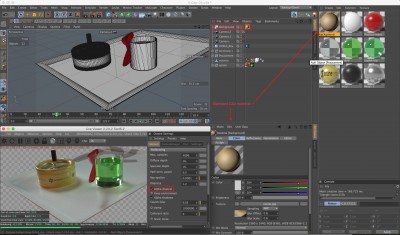
- Before
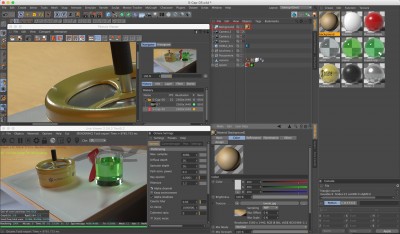
- After
ciao beppe
Re: How to turn off HDRI visibility
Posted: Mon Dec 14, 2015 3:05 am
by senorpablo
It would be great to get similar functionality in Max. Octane is using Max's environment background slot for lighting so there's no way to specify a separate background node.
Mentalray and Iray use a node called 'Environment background switcher' which lets you specify separate nodes for lighting and background.