Page 1 of 1
Unable to match Passes to Beauty in Photoshop or AE
Posted: Tue May 19, 2015 12:08 pm
by 3dgeeks
Im testing Render passes, and particularly Light ID passes, and trying to comp them to match the Beauty pass. I am unable to make them look the same.
Settings - Octane v2.23.2 - 1.8
Output HDR unclamped
Linear out, no white balance, no vignette, exposure 1. Other setting are in image.
(also sorry for the horrid render everyone, im just using a simple scene with no tonemapping to test).
Passes Used - Ambient + Light passes
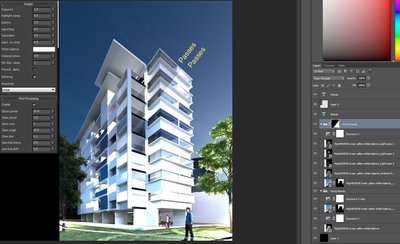
- Photoshop passes overlaid
In after effects (image attached) the problem was worse.
I used Linear Dodge (Add) in a 32bit project.
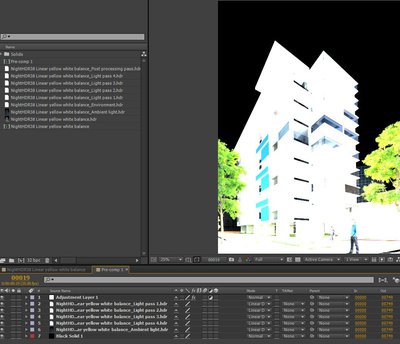
- After Effects
Re: Unable to match Passes to Beauty in Photoshop or AE
Posted: Wed May 20, 2015 9:14 am
by 3dgeeks
I followed the great C4D tutorial as closely as possible
https://vimeo.com/119841910
but am still not getting any result even in the most simple scene.
Its a shame max version cant output direct to PSD format, it might make it simpler. Also being able to save tone mapping out as a pass (so that we didnt have to use linear) might be good.
Re: Unable to match Passes to Beauty in Photoshop or AE
Posted: Wed May 20, 2015 10:38 am
by Dom74
3dgeeks wrote:I followed the great C4D tutorial as closely as possible
https://vimeo.com/119841910
but am still not getting any result even in the most simple scene.
Its a shame max version cant output direct to PSD format, it might make it simpler. Also being able to save tone mapping out as a pass (so that we didnt have to use linear) might be good.
Agree with 3dgeeks, please, do something.

Re: Unable to match Passes to Beauty in Photoshop or AE
Posted: Wed May 20, 2015 12:20 pm
by aoktar
Don't use srgb images on saving. Result would be great If everything is linear.
Re: Unable to match Passes to Beauty in Photoshop or AE
Posted: Thu May 21, 2015 2:55 am
by 3dgeeks
Thanks aoktar, you the man.
I was able to get it to work in Photoshop now by setting gamma to 1.
Things that produce incorrect Output -
- response must be linear
- any gamma other than 1
Post process pass works fine.
Could not get it working in after effects (using a 32 bit project color setting with Linear dodge) though it was very close after I also selected the Color settings/blend colors using 1.0 gamma. Is there another setting im missing.