Page 1 of 1
mask and alpha map
Posted: Mon Apr 06, 2015 2:40 pm
by Scottiefeng
Hi guys,
I have got the mask map as below that I want to apply to a knife. I try to make the black part transparent so that it would not block the steel texture.
Any idea how? thanks
Re: mask and alpha map
Posted: Mon Apr 06, 2015 3:02 pm
by linvanchene
Scottiefeng wrote:Hi guys,
I have got the mask map as below that I want to apply to a knife. I try to make the black part transparent so that it would not block the steel texture.
Any idea how? thanks
You can combine any two image and color nodes with the
"Mix Texture" node.
- In the amount input pin you either plug an RGBA image with an alpha layer or a bw grayscale mask image.
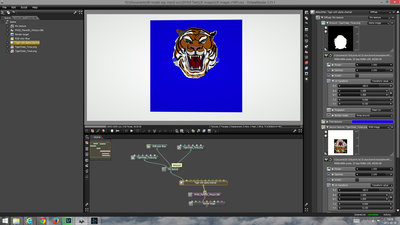
- Mix Texture - OR standalone
Example:
2d plane primitive with
- Tiger.png with an alpha layer.
- Blue RGB color node
- - -
Note:
The "Mix Texture" node is not the same as the "Mix Material" node.

- - -
Re: mask and alpha map
Posted: Tue Apr 07, 2015 1:19 pm
by Scottiefeng
linvanchene wrote:Scottiefeng wrote:Hi guys,
I have got the mask map as below that I want to apply to a knife. I try to make the black part transparent so that it would not block the steel texture.
Any idea how? thanks
You can combine any two image and color nodes with the
"Mix Texture" node.
- In the amount input pin you either plug an RGBA image with an alpha layer or a bw grayscale mask image.
Mix Texture - OR standalone v1001.jpg
Example:
2d plane primitive with
- Tiger.png with an alpha layer.
- Blue RGB color node
- - -
Note:
The "Mix Texture" node is not the same as the "Mix Material" node.
- - -
Works! Thanks mate.