Page 5 of 7
Re: Which card as extension on a Titan Black?
Posted: Wed Feb 25, 2015 2:39 pm
by sikotik13
Personally, I would say the biggest threat in the current configuration is to the processor on the right, since that radiator is essentially resting on the Titan, it's acting as a heatsink for both that processor and the Titan. Unless you are really stressing both at the same time, it shouldn't really be an issue, but something I would definitely keep a close eye on in the meantime, if doing something more CPU and GPU intensive (concurrently) than Octane rendering (video encoding and gaming come to mind, though I'm sure there are other scenarios).
Also, to my knowledge (someone feel free to correct me if I'm mistaken) the GPU doesn't shut down cores, it lowers the clock to reduce temperatures (older models lowered their power draw, if memory serves). And as smicha pointed out below (damn my slow response time!), MSI Afterburner and EVGA Precision X both allow you to adjust fan curve and memory/core clock rates, as well as monitor temps and said clock rates.
Re: Which card as extension on a Titan Black?
Posted: Wed Feb 25, 2015 2:41 pm
by smicha
Heerko wrote:Is there software where I can see if the graphics card is shutting down cores to keep the card temperature low?
MSI afterburner - set temp limit and it will reduce core clocks.
Re: Which card as extension on a Titan Black?
Posted: Wed Feb 25, 2015 3:05 pm
by Heerko
I am learning a lot over here! Cool, thanks guys.

Re: Which card as extension on a Titan Black?
Posted: Wed Feb 25, 2015 3:20 pm
by smicha
Remove all hdd and ssd and get rid of the cages.This will improve ventilation from front fans.
Buy this for ssd and mount it into higher 1x5.25 bay
http://www.icydock.com/goods.php?id=184
and this for hdd into 2x5.25 bay
http://www.icydock.com/goods.php?id=157
Re: Which card as extension on a Titan Black?
Posted: Wed Feb 25, 2015 3:43 pm
by Heerko
Yeah
I was already looking into that.
I rather would have something cheap-ass like this:
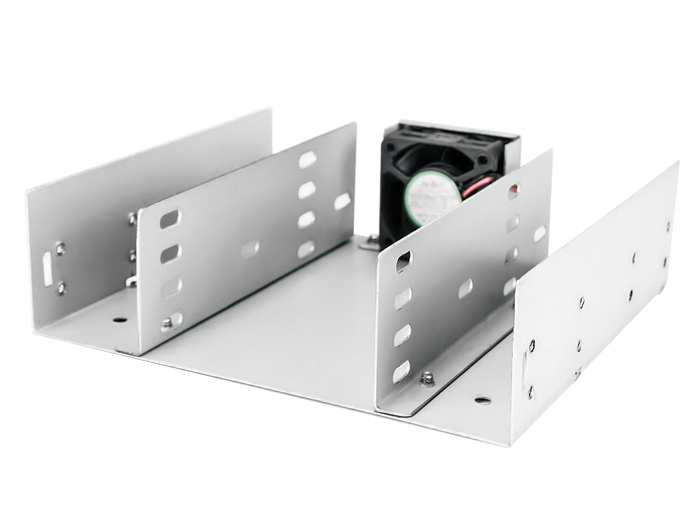
But cant find it anywhere to be sold over here.
Do SSD's really need cooling?
For the HDD this will suffice right?

Re: Which card as extension on a Titan Black?
Posted: Wed Feb 25, 2015 3:47 pm
by smicha
SSDs are fine without extra cooling. HDD shall have some air flow.
Everything is fine that makes more free room in your case for better ventilation.
Re: Which card as extension on a Titan Black?
Posted: Thu Feb 26, 2015 10:01 am
by Heerko
Yesterday evening I ordered the two 780's, 2 brackets for the HDD's and a Lian Li BZ-525B which can fit four SSD's.
And now probably a 10+ days wait because the shop didn't have them in stock.

Re: Which card as extension on a Titan Black?
Posted: Thu Feb 26, 2015 10:06 am
by smicha
What is the price for lian li?
Re: Which card as extension on a Titan Black?
Posted: Thu Feb 26, 2015 10:08 am
by Heerko
Re: Which card as extension on a Titan Black?
Posted: Fri Feb 27, 2015 1:44 pm
by Heerko
Hmm got a mail back from the webshop that they actually can't supply the cards.

I found another shop which claims thet still can deliver, but they cant give an estimate on delivery time. Only that it is more than 3 weeks.
Now I'm not sure what to do. I find the Titan Blacks, Titan Z pretty expensive in comparison to the 780 strix.
So should I wait for the GTC conference and wait for card prices to drop, or a new card being announced?
Although a new card will be very expensive the first few months.
Or should I order the 780's and wait weeks for them?
What do you guys think?