Page 4 of 5
Re: OctaneRender® for 3ds max® v2020.1.5 - 10.19
Posted: Wed Oct 21, 2020 6:29 am
by mbetke
Samsue you ever tried to export your scene to ORBX and render it in stand alone?
Re: OctaneRender® for 3ds max® v2020.1.5 - 10.19
Posted: Wed Oct 21, 2020 8:31 am
by samsue
Not this time, but I've done this test a few times. They are usually consistent on other platforms.
I'm not going any comment

just pointing out the error.
Re: OctaneRender® for 3ds max® v2020.1.5 - 10.19
Posted: Wed Oct 21, 2020 12:36 pm
by paride4331
[quote="samsue"]the old out-of-core buddy[/quote
Hi samsue,
you would set the GPU headroom, as default it comes, to 512MB. It is not recommended to set it to 100mb as you did.
Regards
Paride
Re: OctaneRender® for 3ds max® v2020.1.5 - 10.19
Posted: Thu Oct 22, 2020 7:37 am
by samsue
paride4331 wrote:samsue wrote:the old out-of-core buddy[/quote
Hi samsue,
you would set the GPU headroom, as default it comes, to 512MB. It is not recommended to set it to 100mb as you did.
Regards
Paride
was 512 I took the print when I was testing with 100 to 1024.
Can you send me a link where I can read about GPU headroom and what exactly is it?
Re: OctaneRender® for 3ds max® v2020.1.5 - 10.19
Posted: Thu Oct 22, 2020 12:41 pm
by paride4331
samsue wrote:paride4331 wrote:samsue wrote:the old out-of-core buddy[/quote
Hi samsue,
you would set the GPU headroom, as default it comes, to 512MB. It is not recommended to set it to 100mb as you did.
Regards
Paride
was 512 I took the print when I was testing with 100 to 1024.
Can you send me a link where I can read about GPU headroom and what exactly is it?
Hi samsue,
GPU Headroom - Determines the amount of GPU memory to leave free on each graphics card when storing image textures or geometry data. VRAM is faster than RAM, therefore GPU Head Room tends to be set to a minimal level since it is practical to have the maximum amount of texture and geometry data fitted into VRAM.
keep in mind your workstation needs VRAM as well, unless you have a dedicated graphics card.
Regards
Paride
you
Re: OctaneRender® for 3ds max® v2020.1.5 - 10.19
Posted: Thu Oct 22, 2020 4:42 pm
by HHbomb
Hi,
could it be possible to have a "reset button" in Daylight, to reset model parameters ?
I use to change saturation of sky to remove bluyish color in renders, but when I need to reset daylight model parameters to default it is a pain.
( and If I add a new daylight it copy parameter of previous one )
Thanks
Re: OctaneRender® for 3ds max® v2020.1.5 - 10.19
Posted: Fri Oct 23, 2020 8:04 pm
by coilbook
Hi Paride,
Why does direct mode in itoo settings require up to 1 min eval time each frame (it almost like it reloads all itoo objects every frame) Legacy doesnt do this. And what is standard mode for? Is it a bug? What mode should we use?
Re: OctaneRender® for 3ds max® v2020.1.5 - 10.19
Posted: Sun Oct 25, 2020 8:34 pm
by nick73
paride4331 wrote:nick73 wrote:Hello,
I don't know if this is a bug of the plugin.
Using different values with Mesh UV Projection works fine in 3ds max. But when I export the object as orbx and open it with standalone, changing the UV set doesn't affect the mapping. Octane seems to ignore it and uses only the default value.
Thanks in advance.
Hi Nick73,
are you referring to material UV transform? It seems to work.
Regards
Paride
Hi Paride,
First 3 pictures are with 3ds max 2020 with Mesh UV set to 1,2,3

- UV1
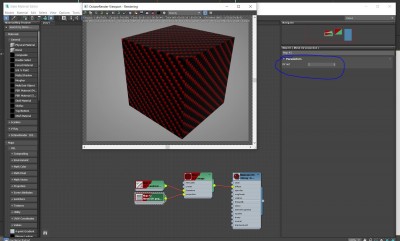
- UV2
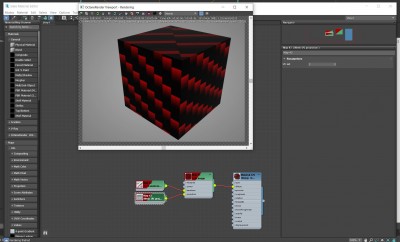
- UV3
Then I exported file to standalone and:
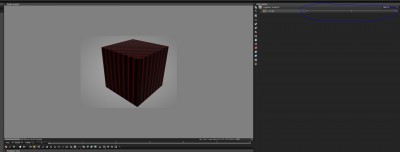
- UV1

- UV2

- UV3
I can sent the files as well
Re: OctaneRender® for 3ds max® v2020.1.5 - 10.19
Posted: Sun Oct 25, 2020 8:57 pm
by nick73
Hi Paride,
Converting materials has been broken in 10.19. Previous release did convert normal map and I should only toggle it from bump node to normal. Now It's missing at all. I guess I preferred as it was before. Another thing, I believe the script should convert transparency map into transmission node with a gamma of 2.2. I am using this all the time with good results.
Thank You.
Re: OctaneRender® for 3ds max® v2020.1.5 - 10.19
Posted: Mon Oct 26, 2020 2:50 pm
by paride4331
HHbomb wrote:Hi,
could it be possible to have a "reset button" in Daylight, to reset model parameters ?
I use to change saturation of sky to remove bluyish color in renders, but when I need to reset daylight model parameters to default it is a pain.
( and If I add a new daylight it copy parameter of previous one )
Thanks
Hi HHbomb,
yes, it makes sense.
Regards
paride